
Download Copying Machine – Free Windows Utility for Bulk Document Copying
Copying Machine is a no-frills, free software utility designed exclusively for Windows users who need to make multiple copies of documents or images with minimal effort. Released in 2007 by Xs4all, this compact tool has stood the test of time, offering a reliable solution for printing and copying tasks without the need for complex setup or expensive hardware. Despite its age, Copying Machine remains a favorite among users in India, Bangladesh, and Finland—countries where efficiency and simplicity are highly valued.
With a file size smaller than most modern applications, it runs smoothly on older systems, including Windows 95 and earlier versions. This makes it an ideal choice for legacy hardware still in use in homes and small businesses. The program supports all standard printers and operates directly through the Windows printing system, eliminating the need for additional drivers or plugins.
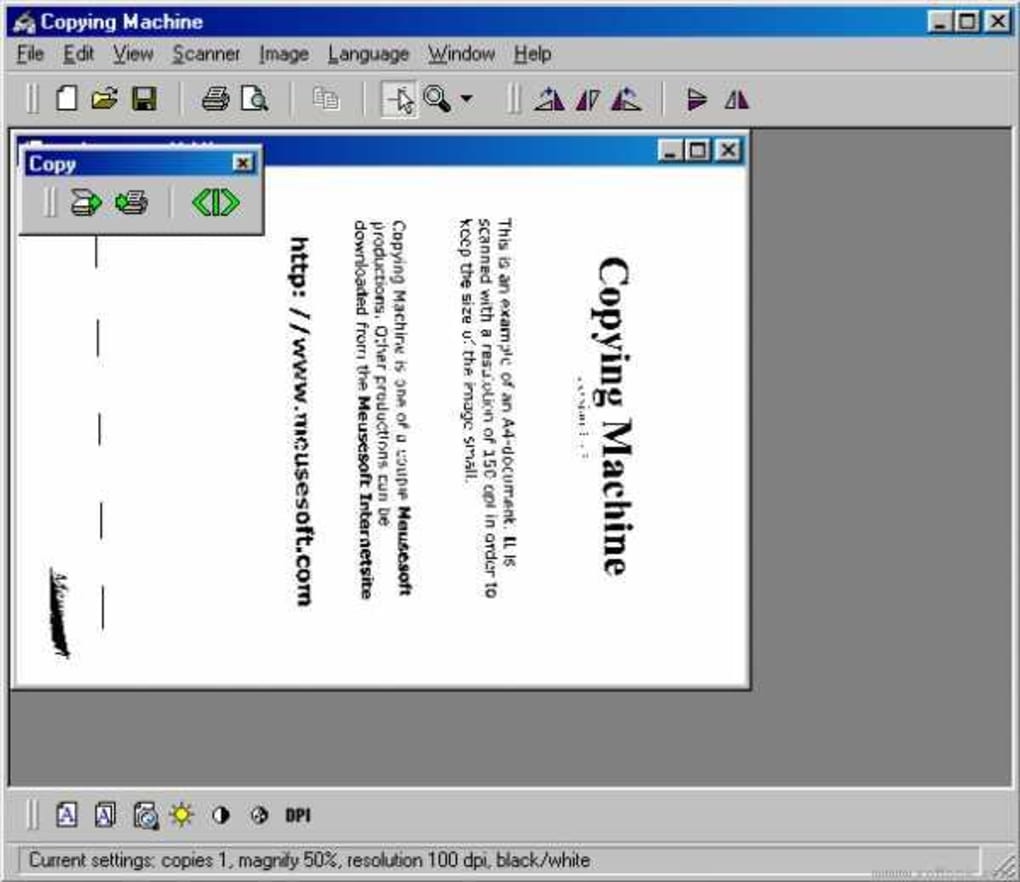
Whether you're preparing multiple copies of a contract, handouts, or images, Copying Machine streamlines the process with just a few clicks. Its minimal interface ensures that users aren’t overwhelmed by unnecessary options, focusing instead on the core task: duplication. The latest version, 2.26, was updated on March 25, 2007, and while no further updates have been released, its stability and simplicity have kept it relevant.
With over 16,000 downloads since joining the software library in 2007, it's clear that users appreciate its straightforward functionality and lack of ads or in-app purchases.
Key Features of Copying Machine
Copying Machine delivers essential functionality with remarkable efficiency. One of its standout features is the ability to generate multiple copies of a single document or image with a single command. This eliminates the need to manually send the same print job repeatedly, saving time and reducing user error. The software is designed for simplicity—users simply select the file, specify the number of copies, and click “Print.” The program then handles the rest, sending the job to the default printer without requiring complex configurations. This makes it ideal for small offices, schools, and home users who need to produce bulk copies regularly.
Another major advantage is its lightweight design. At just a few megabytes, Copying Machine uses minimal system resources, making it perfect for older computers running Windows 95, 98, or ME. Unlike many modern software tools that demand high RAM and processing power, this utility runs smoothly even on machines with limited memory and slower CPUs.
It’s also completely free—no trial periods, no subscriptions, no hidden fees. The absence of ads or in-app purchases ensures a clean, distraction-free experience. Furthermore, the program is compatible with all standard printers, including laser and inkjet models, as long as they are recognized by Windows.
This broad compatibility means users don’t need to worry about driver conflicts or hardware limitations. It’s also secure by design—since it doesn’t require internet access or external dependencies, there’s no risk of data leaks or malware exposure. For users who value privacy and performance, Copying Machine offers a trustworthy alternative to bloated, feature-heavy software.
Additionally, the software supports batch processing, allowing users to queue multiple files for copying in sequence. This feature is especially useful when preparing materials for meetings, events, or classroom distribution. The interface remains intuitive throughout, with clearly labeled buttons and straightforward navigation.
Even users with limited technical knowledge can master it in under a minute. While it lacks advanced features like duplex printing or image editing, it excels in its core purpose: making multiple copies quickly and reliably. For those seeking a no-nonsense, secure, and free tool for everyday printing tasks, Copying Machine remains a solid choice.
How to Install and Use Copying Machine
Installing Copying Machine is a straightforward process, especially for users familiar with older Windows systems. Since it’s designed for Windows 95 and earlier versions, the installation typically involves downloading the setup file from a trusted source and running it. Once the installer launches, follow the on-screen prompts to choose the installation directory. The program does not require administrative privileges in most cases, making it accessible even on restricted user accounts. After installation, Copying Machine adds a simple icon to the desktop or Start menu, depending on the system configuration.
To use the software, launch Copying Machine and navigate to the “File” menu or use the “Open” button to select the document or image you wish to copy. Supported formats include common file types such as .doc, .pdf, .jpg, .bmp, and .tiff. Once the file is loaded, enter the desired number of copies in the designated field.
The program allows you to specify any number, from 1 to 999, giving you full control over the output. When ready, click the “Print” button. Copying Machine will send the job to the default printer, automatically repeating the print command the specified number of times.
This process is seamless and fast, with no visible delays or error messages under normal conditions.
For users managing multiple files, the batch mode feature is particularly useful. You can add several documents to a queue and set the number of copies for each one. The software will process them in order, minimizing manual intervention.
This is ideal for preparing handouts, flyers, or reports for distribution. It’s important to note that the program does not support advanced print settings like duplex printing, paper size selection, or color adjustments—these must be configured through the printer’s own settings or Windows print dialog. However, for basic copying tasks, this limitation is negligible.
Overall, the learning curve is nearly zero, making it accessible to all users, regardless of technical skill level. With its minimal footprint and intuitive workflow, Copying Machine delivers a hassle-free experience that prioritizes speed and reliability.
Compatibility and System Requirements
Copying Machine is specifically designed for older Windows operating systems, including Windows 95, Windows 98, Windows ME, and earlier versions. It is not compatible with Windows XP or later systems, which limits its usability for modern users. However, for those still running legacy hardware or using older machines for specific tasks, this software remains a viable option. The program requires minimal system resources—just 2 MB of RAM and 1 MB of free disk space—making it suitable for computers with limited memory and storage capacity. It does not rely on external libraries or runtime environments, so no additional software installations are needed.
Since Copying Machine operates through the standard Windows printing system, it works with any printer that is recognized by the OS. This includes a wide range of inkjet, laser, and dot matrix printers from brands like HP, Canon, Epson, and Brother. As long as the printer driver is installed and functioning correctly in Windows, Copying Machine will work seamlessly.
It does not require proprietary hardware or special configurations, which enhances its accessibility. The software is available only in English, so users must be comfortable with the language to navigate the interface. While this may be a barrier for non-English speakers, the simple layout and clear labels make it easy to understand even for beginners.
Despite its age, Copying Machine has maintained a strong reputation for stability and security. Because it doesn’t connect to the internet or access external services, there’s no risk of malware or data breaches. It’s also completely free, with no trial periods or subscription models.
For users in developing regions where access to modern software is limited, this utility offers a cost-effective solution for document duplication. While it may not be suitable for everyone, it fills a niche role for those who value simplicity, speed, and compatibility with older systems. If you’re working with legacy hardware or need a no-fuss tool for bulk copying, Copying Machine is worth considering.
Pros and Cons of Copying Machine
- Pros:
- Completely free with no ads or in-app purchases
- Extremely lightweight—ideal for older or low-resource systems
- Simple, intuitive interface with minimal learning curve
- Supports batch processing for multiple files
- Works with any standard Windows-compatible printer
- Secure and offline—no internet access required
- Stable and reliable after years of use
- Cons:
- Only compatible with Windows 95 and earlier versions
- No support for modern print features (e.g., duplex, color management)
- Not available for Mac, Android, or iOS
- Outdated interface with no modern design elements
- Latest update was in 2007—no future development planned
Frequently Asked Questions (FAQ)
Is Copying Machine safe to download?
Yes, Copying Machine is safe to download and use. It’s a lightweight, standalone utility that doesn’t require internet access or external dependencies. Since it’s been around since 2007 and has over 16,000 downloads without reported security issues, it’s considered a trustworthy tool for basic copying tasks.
Can I use Copying Machine on Windows 10 or 11?
No, Copying Machine is not compatible with Windows 10 or 11. It was designed for Windows 95 and earlier versions. However, you can try running it in compatibility mode, though success is not guaranteed.
Does Copying Machine support PDF files?
Yes, Copying Machine supports PDF files as long as they are opened by a compatible application or directly recognized by Windows. You can open a PDF and print multiple copies using the tool.
Is there a mobile version for Android or iOS?
No, Copying Machine is only available for Windows and has no official mobile version for Android or iOS devices.
Can I use Copying Machine to print on both sides of the paper?
Copying Machine itself does not support duplex printing. This feature must be enabled through your printer’s driver settings or the Windows print dialog.
Conclusion: A Timeless Tool for Simple Copying Tasks
Despite its age, Copying Machine remains a valuable tool for users who need a fast, free, and reliable way to make multiple copies of documents or images. Its lightweight design, minimal interface, and lack of ads make it a refreshing alternative to modern software that often comes with bloat and complexity. While it’s limited to older Windows systems and lacks advanced features, it excels in its core purpose: simplicity and efficiency. For small offices, schools, or individuals using legacy hardware, this utility offers a secure and cost-effective solution.
If you’re looking for a free Windows utility that gets the job done without fuss, Copying Machine is worth downloading. It’s a proven tool with a strong track record, perfect for those who value functionality over flashy design. Download Copying Machine today and experience the power of no-nonsense software.







